Network protection
Since v0.17.2 you can act on what the Network and HTTP tabs show. Nothing here changes traffic until you act: blocking, auto-ban and rate limits are all opt-in.
| Piece | Where | Permission |
|---|---|---|
| Block an IP or range | Network → Blocked IPs, or Block on a connection, client or threat row | network.protect (admins); the list needs network.view |
| SSH brute-force detection and auto-ban | Server → Network → Blocked IPs | network.protect |
| Firewall rule counters | Server → Firewall | network.view |
| Path rate limits at the edge | Network → Rate limits | edge.manage; the list needs edge.view |
Block an address
Section titled “Block an address”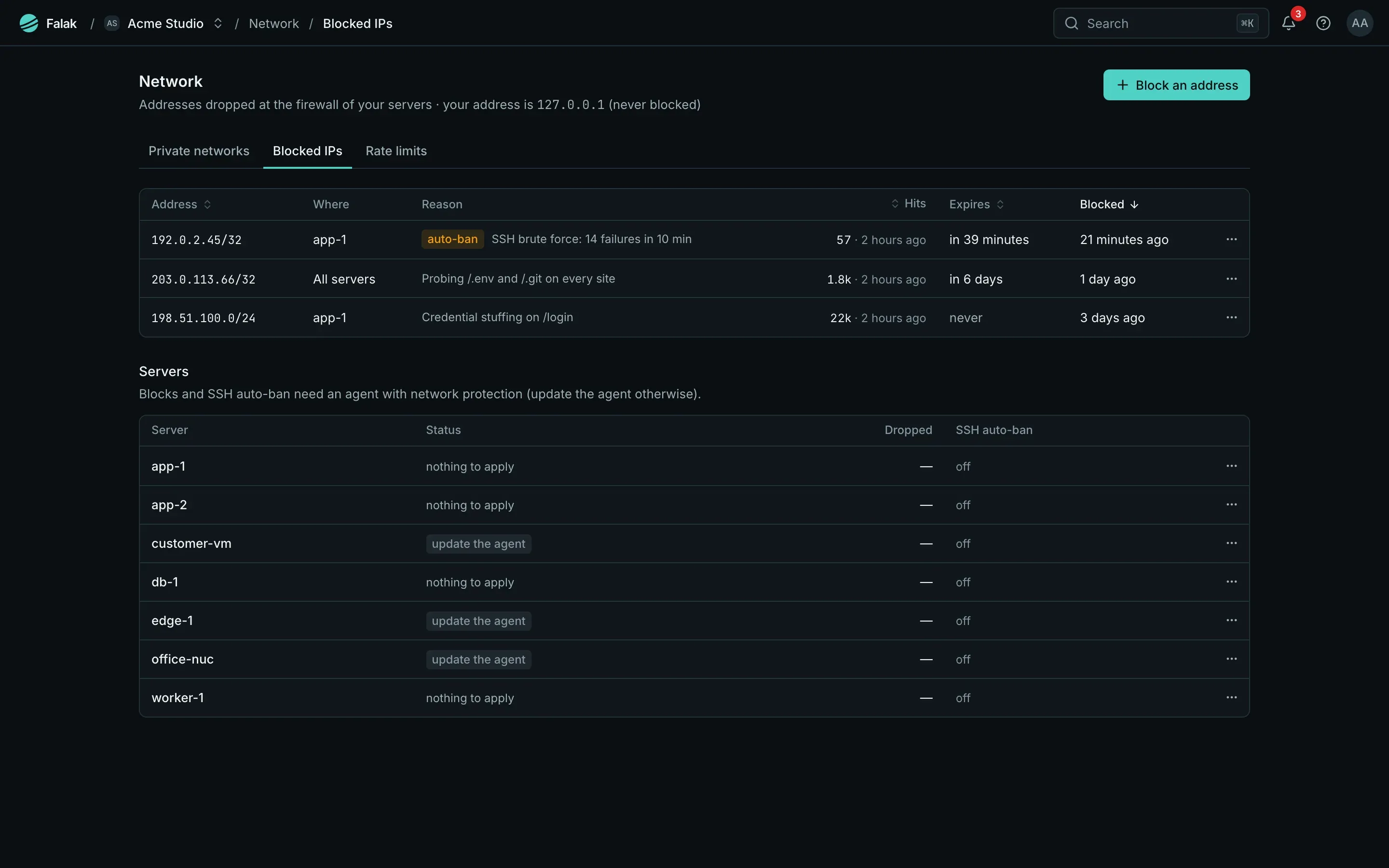
- Open Network → Blocked IPs and click Block an address, or click Block on a row of a Network, HTTP or Threats table.
- Enter an IP or CIDR, the reach (one server, or every server of the organization), an expiry (1 hour, 24 hours, 7 days or permanent) and a reason.
- Save. The agents apply it within seconds.
- Blocks drop packets before anything else: the host, native sites, the edge and published container ports alike. Established connections from a blocked address are cut too.
- They live in their own nftables table (
inet falak_protect), so your firewall rules are never touched. The kernel expires timed blocks; the agent restores them after a reboot. - The list shows hits and the last hit per block. Every block and unblock is audited.
- Limits: 30 block changes a minute per user, 5,000 active blocks per organization. A block that overlaps an active one with the same reach is refused.
Guards: you can’t lock yourself out
Section titled “Guards: you can’t lock yourself out”Refused outright:
0.0.0.0/0,::/0, and prefixes shorter than /8 (IPv4) or /16 (IPv6); loopback, link-local, multicast;- a range containing your own IP, the control plane, any server of the organization or a private network;
- a range containing an address a member used the panel from in the last 30 days.
Need a “block anyway” confirmation: private ranges (10/8, 172.16/12, 192.168/16, 100.64/10, fc00::/7), ranges broader than /16 (IPv4) or /48 (IPv6), and a peer the server itself connects to (blocking it also cuts the server’s own connections to it).
The agent checks again and never blocks the server’s own addresses, its DNS resolvers or its gateway. Guards are re-applied when servers, networks or agents change and every 10 minutes: a block that would now cover a protected address is suspended, marked in the list, and you get a network.block_suspended alert.
SSH brute force
Section titled “SSH brute force”The agent reads sshd’s messages once a minute (from root’s sshd entries in the journal, falling back to /var/log/auth.log). Each connection with failed logins counts once, IPv6 per /64. A server with 20 or more failures in a report gets a security Issue, SSH brute force on <server>, listing the top sources.
Auto-ban is off by default and set per server: N failures in M minutes bans the address for T (defaults 10 failures in 10 minutes for 1 hour). Bans appear in the Blocked IPs list as automatic blocks and can be lifted.
- Only root’s sshd journal entries can trigger a ban: lines in
auth.logcan be written by any local user, so they are reported but never ban anyone. Keep journald storage on to use auto-ban. - Auto-bans skip private ranges and addresses that logged in successfully over SSH in the last 24 hours.
- Turning auto-ban off keeps existing bans until they expire; unblock them to lift them now.
Firewall rule counters
Section titled “Firewall rule counters”The Firewall tab shows packets and bytes next to each rule, plus how many packets the block lists dropped. After the agent update, the firewall is reloaded once (atomically, same rules) to add the counters.
Rate limits at the edge
Section titled “Rate limits at the edge”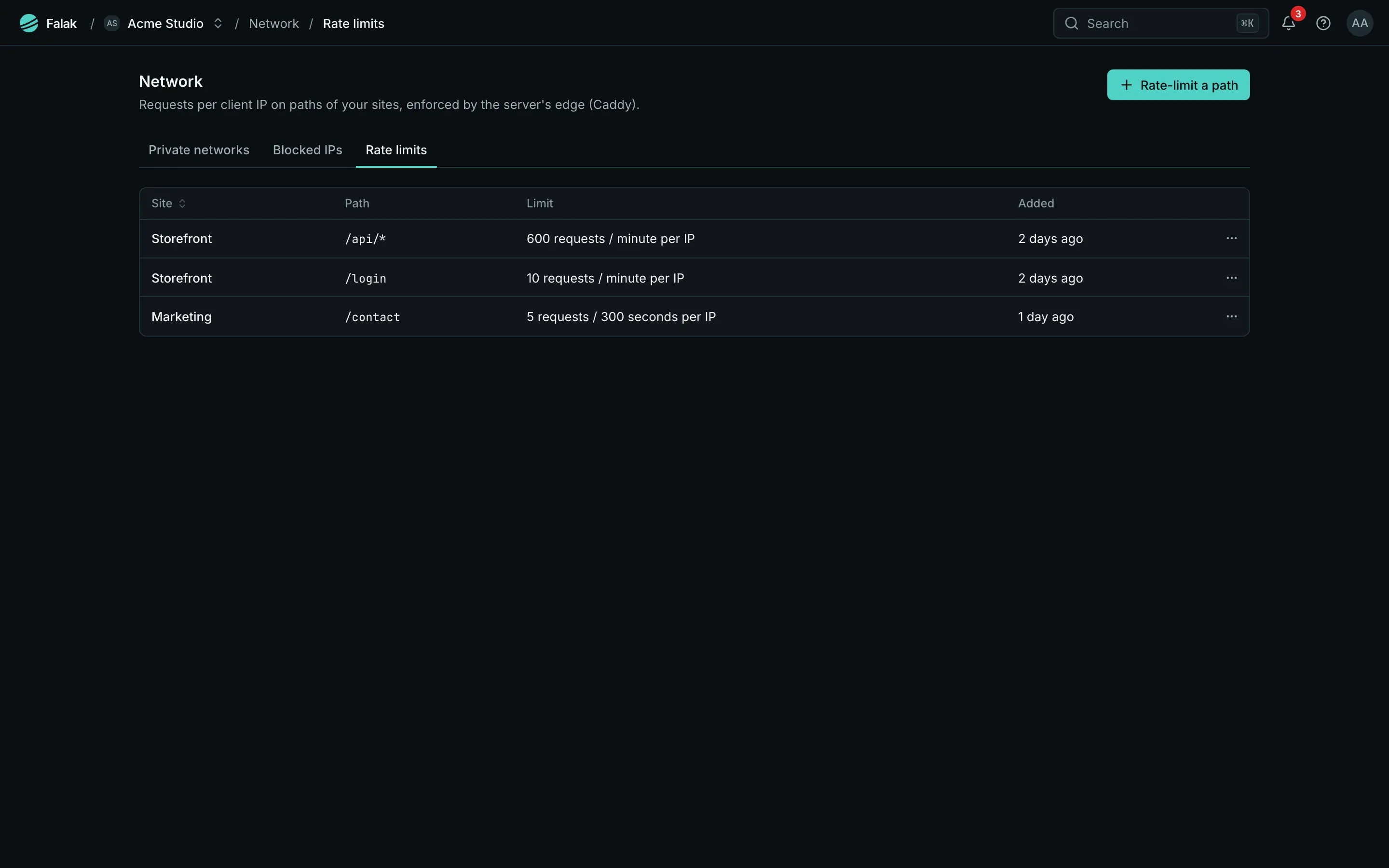
Network → Rate limits: per site, at most N requests per client IP to a path (exact, or a prefix ending in *) within a window. More get 429 with Retry-After.
- Up to 20 rules per site; 1–100,000 requests; a window of 1 second to 1 day. Changes are audited.
- They work for every site, proxied by Cloudflare or not, and complement Cloudflare rate limits. Behind Cloudflare’s trusted proxies the visitor’s IP is counted.
- The first rule on a server installs Falak’s Caddy build (Caddy with the rate-limit module), downloaded from your control plane and verified by checksum. The agent validates your edge config with it, switches the edge once (about a second for that server’s sites) and switches back automatically if the edge doesn’t come back.
- Servers and sites without rules don’t change at all. A refusal never takes other sites down: the config is applied without the rate limits, and the page says why.
Requirements
Section titled “Requirements”Agent feature net.protection (v0.17.2); rate limits also need the edge feature edge.rate_limit. Older agents get nothing new, and the page asks for an update.