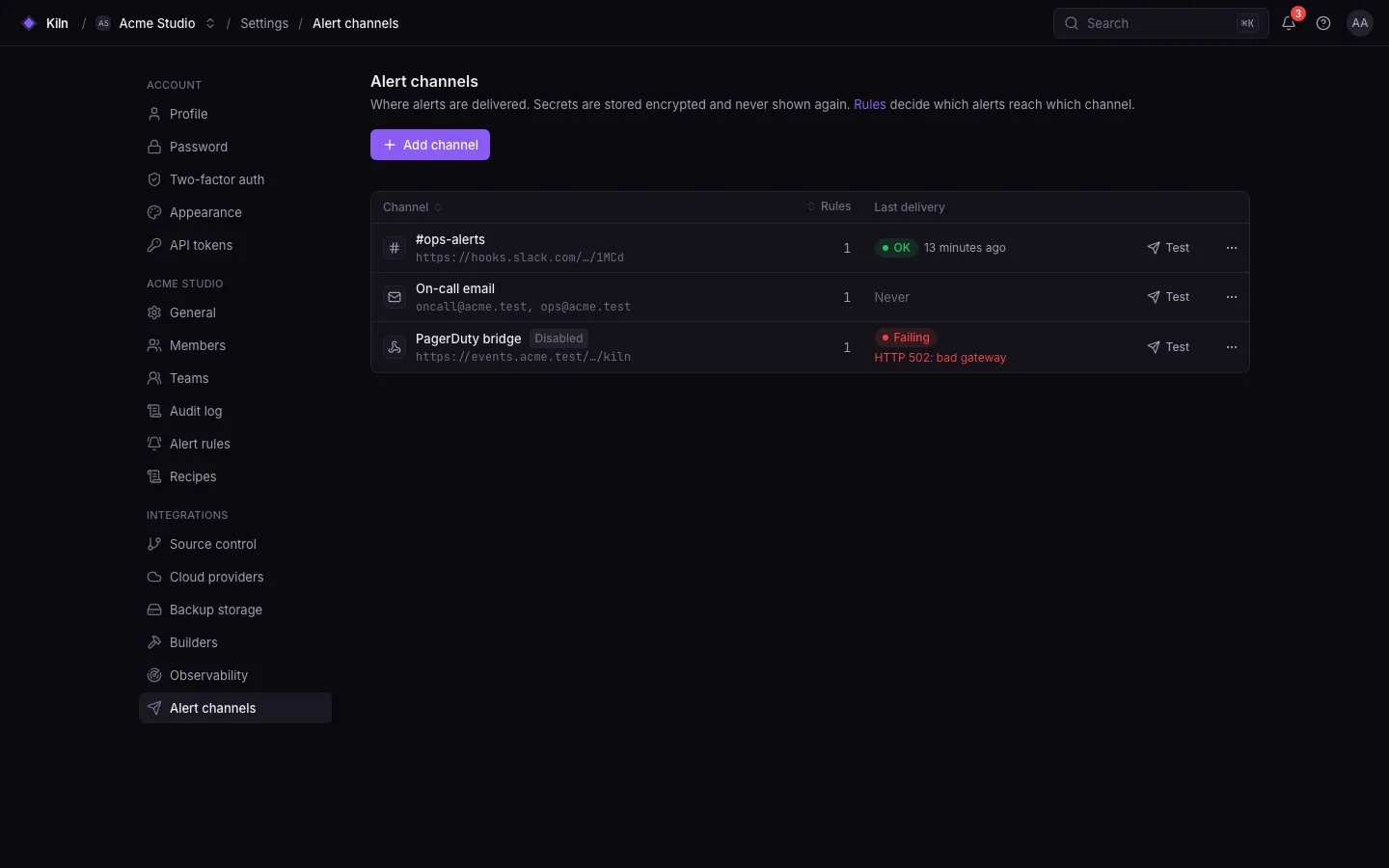
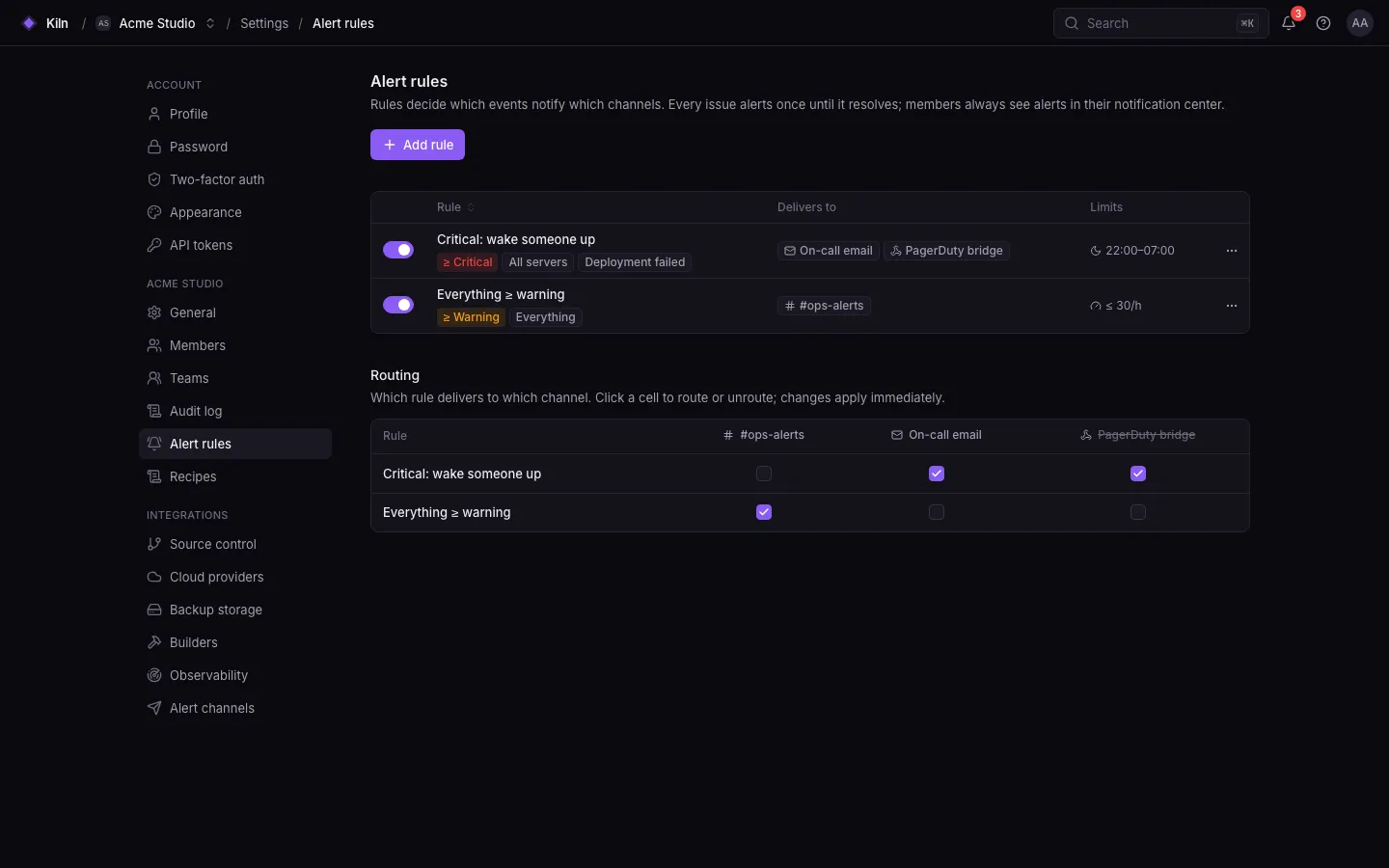
Falak raises an alert when something needs attention. Rules decide which alerts go to which channels . Every alert also lands in the in-app notification center (the bell).
Open Settings → Alert channels → Add (alerting.manage, owners and admins).
Pick the type and fill in its settings.
Save, then send a test.
Setting
Rule
Recipients
1–20 e-mail addresses
Needs working mail on the control plane (MAIL_*). See Configuration .
Setting
Rule
Webhook URL
https://hooks.slack.com/services/…, /workflows/… or /triggers/…
Setting
Rule
Webhook URL
https://discord.com/api/webhooks/… (also discordapp.com, canary., ptb.)
Setting
Rule
Bot token
123456:ABC… from @BotFather
Chat id
A numeric id (-100… for groups) or @channelname
Setting
Rule
URL
http(s)://…, public hosts only (see below)
Secret
16–255 characters, used to sign deliveries
Each delivery carries these headers:
Header
Value
X-Falak-EventThe alert type, e.g. deployments.failed
X-Falak-DeliveryUnique delivery id
X-Falak-TimestampUnix timestamp
X-Falak-Signaturesha256= + HMAC-SHA256(secret, <timestamp>.<raw body>)
$expected = ' sha256= ' . hash_hmac ( ' sha256 ' , $ timestamp . ' . ' . $ rawBody , $ secret );
abort_unless ( hash_equals ($ expected , $ request -> header ( ' X-Falak-Signature ' )), 401 );
Webhooks to loopback, private and link-local addresses are refused unless the operator sets FALAK_ALERTING_ALLOW_PRIVATE_WEBHOOKS=true.
Settings → Alert rules → New rule :
Field
Rule
Name
Up to 100 characters
Event types
1–50 patterns: an exact type (deployments.failed), a prefix wildcard (deployments.*) or * for everything
Minimum severity
info, warning or critical
Channels
Up to 20 channels
Rate limit
Optional: at most N deliveries per hour (1–1000)
Quiet hours
Optional start/end (HH:MM), timezone, days (1–7), and whether critical alerts still go through
Type
Label
Severity
deployments.failedDeployment failed
critical
deployments.rolled_backSite rolled back
warning
builds.failedBuild failed
warning
fleet.agent_offlineServer agent offline
critical
fleet.agent_onlineServer agent back online
info
fleet.agent_revokedServer agent revoked
warning
fleet.agent_upgrade_failedAgent upgrade failed
warning
fleet.agent_upgradedAgent upgraded after a failure
info
servers.provisionedServer provisioned
info
processes.crash_loopProcess keeps crashing
critical
processes.recoveredProcess running again
info
network.firewall_failedFirewall apply failed
critical
network.firewall_recoveredFirewall applied again
info
edge.certificate_failedCertificate install failed
critical
edge.certificate_installedCertificate installed
info
databases.backup_failedDatabase backup failed
critical
databases.backup_recoveredDatabase backups succeed again
info
databases.restore_failedDatabase restore failed
critical
databases.restore_succeededDatabase restore finished
info
insights.issue_openedNew issue
warning
insights.issue_regressedIssue regressed
warning
insights.issue_resolvedIssue resolved
info
insights.threshold_breachedPerformance threshold breached
warning
insights.heartbeat_missedScheduled task missed
critical
Observability → Alerts (or Alert history ) lists every alert and its deliveries.The bell in the top bar shows in-app notifications for members with alerting.view.
History older than 90 days is pruned (FALAK_ALERTING_RETENTION_DAYS).
Delivery to real Slack, Discord and Telegram is covered by unit and feature tests, not yet by the end-to-end suite.
The webhook SSRF guard checks the host but does not resolve DNS, so DNS rebinding is not blocked.
Grafana Metric-based alert rules in Grafana.