Connect your own server
“Custom” servers are machines you already have: a VPS from any provider, a dedicated server, a VM on-premises. You create the server in Falak, run one command on the machine, and Falak takes it from there.
Prerequisites
Section titled “Prerequisites”- A fresh Ubuntu LTS machine (24.04 recommended), amd64 or arm64, with systemd.
- Root or sudo access, and
curlorwget. - Outbound HTTPS from the machine to your panel (
https://falak.example.com) and tohttps://agents.falak.example.com. - The machine is not the control plane host.
See Requirements.
Connect
Section titled “Connect”-
Open Servers → Create.
-
Fill in:
Field Notes Name Letters, digits, spaces, .,_,-; unique; becomes the hostname (for exampleapp-1)Type What the server is for. See Server types. Provider Custom (bring your own server) Timezone Default UTCSoftware PHP runtime and versions, Node.js, database, cache, Docker (only options the type allows) SSH keys Organization keys to install for the falakuser -
Click Create server. The server is
creatingand the page shows the install command:Terminal window curl -fsSL https://falak.example.com/install/<token> | sudo sh -
Run it on the machine:
Expected output falak: downloading falak-agent (amd64)falak: enrolling with https://falak.example.comfalak: falak-agent installed and running -
The server turns
provisioning. Follow the output on the server page. When it turnsactive, you can place sites and databases on it.
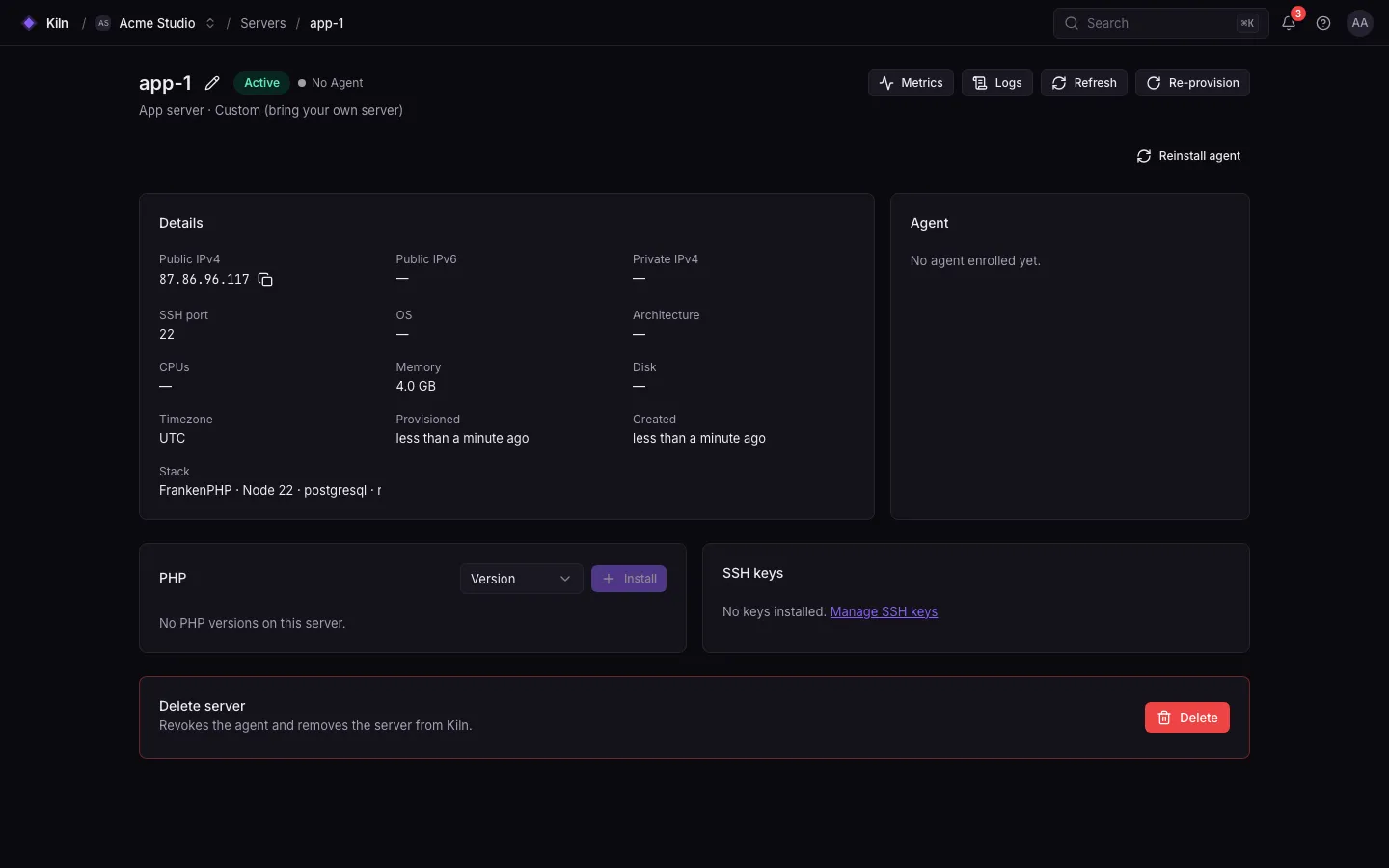
What the install command does
Section titled “What the install command does”- Checks before it changes anything: root, Linux with systemd and apt, amd64 or arm64, the OS (Ubuntu 22.04, 24.04 and 26.04 are supported; other versions and Debian get a warning), that your panel and
agents.<panel>answer, and that the clock is within 5 minutes of the panel’s (mutual TLS needs it). - Downloads
falak-agentfrom your panel (/install/agent/linux-<arch>) and verifies its SHA-256. - Installs it to
/usr/local/bin/falak-agent. - If the machine was connected before, stops the running agent. Its old identity is replaced and backed up in
/etc/falak/previous/(see Reconnect a machine). - Runs
falak-agent enroll --panel https://falak.example.com --token <token>: generates a key, sends a CSR and host facts, and stores the signed certificate in/etc/falak. - Runs
falak-agent install: writes/etc/systemd/system/falak-agent.service, enables and starts it. - Runs
falak-agent check --wait 60sand printsfalak-agent connected as <agent id>. If the agent can’t connect, the command fails with the reason.
Then Falak runs the machine check and, when nothing blocks, sends the provisioning plan. See Provisioning.
Install tokens
Section titled “Install tokens”- A token works once and expires after 24 hours (
FALAK_INSTALL_TOKEN_TTL, in minutes). - Regenerate the command on the server page if it expired (permission
fleet.agents.manage). - Issuing a token is recorded in the audit log.
Through the API
Section titled “Through the API”curl -X POST https://falak.example.com/api/v1/servers \ -H "Authorization: Bearer $FALAK_TOKEN" -H "Accept: application/json" -H "Content-Type: application/json" \ -d '{"name": "app-1", "type": "app", "provider": "custom", "stack": {"php": {"runtime": "frankenphp", "versions": ["8.4"], "default": "8.4"}, "node": "22", "database": "postgresql"}}'The response (201) includes install_command for custom servers. See Servers API.
Troubleshooting
Section titled “Troubleshooting”| Symptom | Fix |
|---|---|
falak: error: run as root |
Use sudo sh at the end of the command. |
systemd is required |
Containers without systemd are not supported. |
download failed |
The machine cannot reach your panel over HTTPS, or the panel’s certificate is not publicly trusted (for example --tls internal). |
enrollment failed |
The token was used or expired, or https://agents.<panel> is unreachable. On the control plane host run falak-ctl doctor; the agent API must answer 401 without a client certificate. |
Stuck in provisioning |
Open the server page for the output. Transient download errors are retried with backoff. |
Server error |
Fix the cause shown, then Re-provision from the server page. |
| Server stays Waiting for agent after you deleted it and ran a new install command on the same machine | From v0.5.2 the install command replaces the old identity by itself. With an older Falak, move the old identity aside first: see Reconnect a machine. |
Install command ends with falak-agent is installed but not connected |
It prints the reason from falak-agent check: revoked identity, agents.<panel> unreachable, TLS error or clock skew. Run sudo falak-agent check again; logs: journalctl -u falak-agent. |
this machine's clock is …s off the panel's |
Turn on time sync: sudo timedatectl set-ntp true, then run the install command again. |
Provisioning step apt, caddy or php:<version> fails on apt-get update |
The error names the repository and its file under /etc/apt/sources.list.d. Fix or remove that file, then Re-provision. A ppa:ondrej/php source with no release for the server’s Ubuntu (for example 26.04) is disabled automatically (renamed to <file>.disabled-by-falak). |
PHP 8.4 is not available on Ubuntu 26.04; installing PHP 8.5 instead |
The PHP PPA has no packages for Ubuntu 26.04 yet, so PHP comes from Ubuntu’s archive, which has only PHP 8.5. Use Ubuntu 24.04 if you need another version. |
Next steps
Section titled “Next steps”ProvisioningExactly what gets installed and configured.
FirewallDefault rules and adding your own.