Deploy scripts
Each native site has a deploy script: bash that runs on your servers during a deployment. Falak splits it at three macros and runs each part at the right moment on the right servers. Edit it under Settings → Deploy → Deploy script.
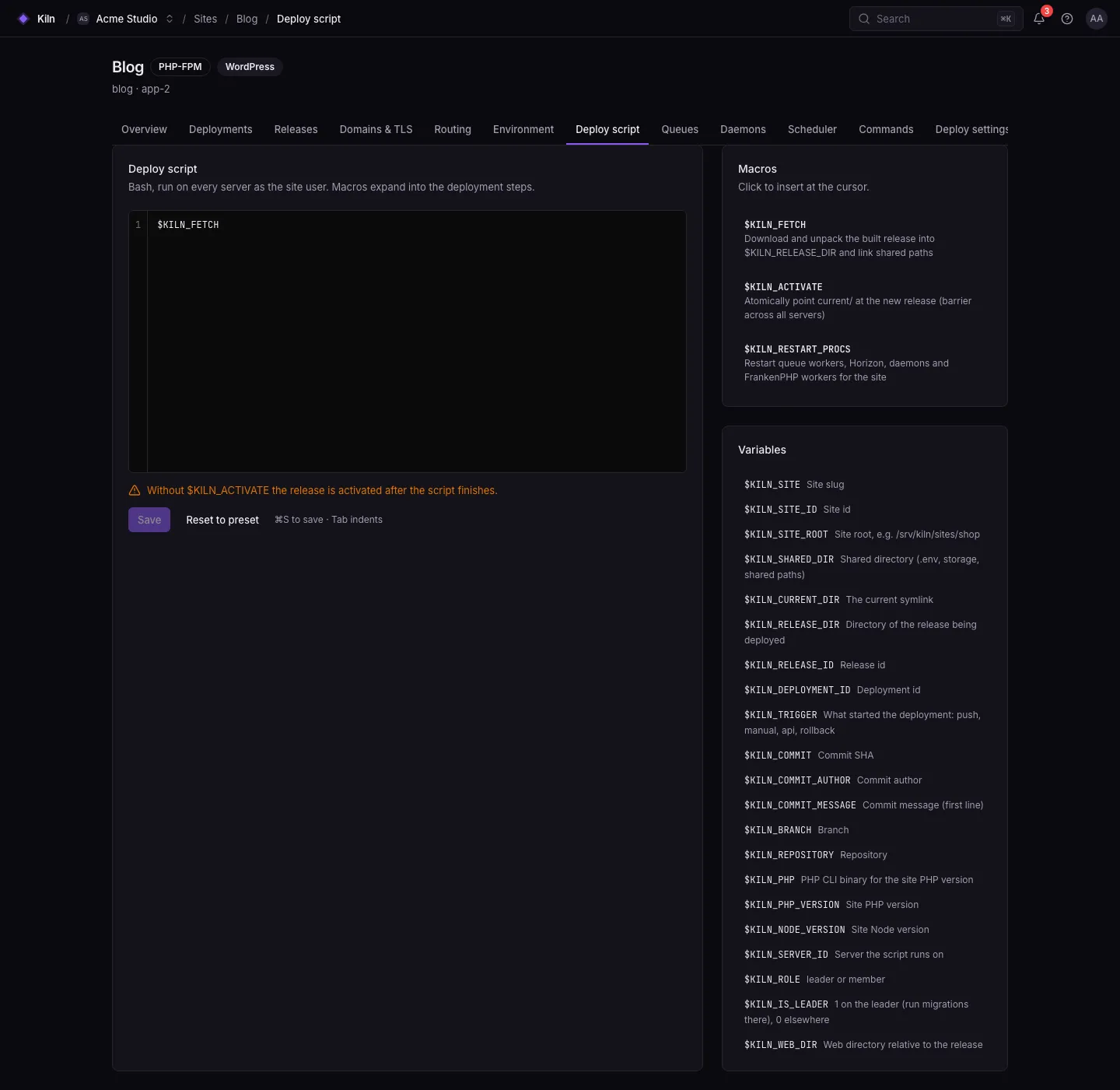
Macros
Section titled “Macros”| Macro | What Falak does in its place |
|---|---|
$FALAK_FETCH |
Download and unpack the built release into $FALAK_RELEASE_DIR, then link shared paths |
$FALAK_ACTIVATE |
Atomically point current at the new release (a barrier across all servers for zero-downtime) |
$FALAK_RESTART_PROCS |
Restart queue workers, Horizon, Octane, daemons and the web process for the site |
Each macro must be on its own line, may appear once, and must be in this order. A macro used inside another line does nothing.
Sections
Section titled “Sections”The macros split the script into four sections:
# 1. before fetch — every server, in the site root (/srv/falak/sites/<site>)$FALAK_FETCH# 2. before activate — every server, in the new release directory# on the leader this runs once all servers are prepared, as the "migrate" phase$FALAK_ACTIVATE# 3. after activate — every server, in current/$FALAK_RESTART_PROCS# 4. after restart — every server, in current/Rules for missing macros:
- No
$FALAK_FETCH: the release is fetched first. - No
$FALAK_ACTIVATE: everything runs before activation, and activation happens after the script. - No
$FALAK_RESTART_PROCS: processes restart right after activation.
Each section runs with set -e as the site user (falak, or the site’s isolated user), with the variables below exported. A non-zero exit fails the deployment; if servers had already switched, they are rolled back. Each section can run for up to 1800 seconds (FALAK_DEPLOY_HOOK_TIMEOUT).
Leader-only steps
Section titled “Leader-only steps”Section 2 runs on every server. Wrap one-time work (migrations, cache warm-ups that write to a shared store) in a leader check:
cd "$FALAK_RELEASE_DIR"if [ "$FALAK_IS_LEADER" = "1" ]; then $FALAK_PHP artisan migrate --forcefiVariables
Section titled “Variables”| Variable | Value |
|---|---|
FALAK_SITE |
Site slug |
FALAK_SITE_ID |
Site id (upper-case ULID) |
FALAK_SITE_ROOT |
Site root, e.g. /srv/falak/sites/shop |
FALAK_SHARED_DIR |
<site root>/shared (.env, storage/, shared paths) |
FALAK_CURRENT_DIR |
The current symlink |
FALAK_RELEASE_DIR |
Directory of the release being deployed |
FALAK_RELEASE_ID |
Release id |
FALAK_DEPLOYMENT_ID |
Deployment id |
FALAK_TRIGGER |
push, manual, api (also for deploy hooks) or rollback |
FALAK_COMMIT |
Commit SHA |
FALAK_COMMIT_AUTHOR (also FALAK_AUTHOR) |
Commit author |
FALAK_COMMIT_MESSAGE |
First line of the commit message |
FALAK_BRANCH |
Branch |
FALAK_REPOSITORY |
Repository |
FALAK_PHP |
PHP CLI for the site’s PHP version, e.g. php8.4 |
FALAK_PHP_BINARY |
Same, for PHP sites |
FALAK_PHP_VERSION |
Site PHP version, e.g. 8.4 |
FALAK_NODE_VERSION |
Site Node version |
FALAK_SERVER_ID |
Server the section runs on |
FALAK_ROLE |
leader or member |
FALAK_IS_LEADER |
1 on the leader, 0 elsewhere |
FALAK_WEB_DIR |
Web directory relative to the release |
FALAK_VAR_<NAME> |
Extra parameters passed to a deploy hook |
Site variables marked Expose to deploy script are exported too, with ${{ … }} references resolved.
Examples
Section titled “Examples”$FALAK_FETCH
cd "$FALAK_RELEASE_DIR"if [ "$FALAK_IS_LEADER" = "1" ]; then $FALAK_PHP artisan migrate --forcefi$FALAK_PHP artisan optimize$FALAK_PHP artisan storage:link --force$FALAK_PHP artisan icons:cache
$FALAK_ACTIVATE$FALAK_RESTART_PROCS
if [ "$FALAK_IS_LEADER" = "1" ] && [ -n "$SLACK_DEPLOY_WEBHOOK" ]; then curl -fsS -X POST -H 'Content-Type: application/json' \ -d "{\"text\":\"Deployed $FALAK_SITE ${FALAK_COMMIT:0:7}\"}" "$SLACK_DEPLOY_WEBHOOK" || truefi(SLACK_DEPLOY_WEBHOOK is a site variable with Expose to deploy script on.)
$FALAK_FETCH
cd "$FALAK_RELEASE_DIR"if [ "$FALAK_IS_LEADER" = "1" ]; then    npx prisma migrate deployfi
$FALAK_ACTIVATE$FALAK_RESTART_PROCSShared paths
Section titled “Shared paths”Shared paths live in $FALAK_SHARED_DIR and are linked into every release by $FALAK_FETCH. Manage them under Settings → Deploy → Shared paths as file or directory entries. Presets add their own (Laravel: storage/ and .env).
Compose and Docker sites
Section titled “Compose and Docker sites”For Docker sites, fetch and activation are an image pull and a blue/green container swap. Compose sites run one-time commands through the falak.deploy.leader_command label rather than the deploy script. See Docker Compose.