Deployments and releases
A deployment takes one commit (or image, or Compose file) to every server of a site. Each server gets a release. This page explains the pipeline, the states you see in the UI and API, and the rules Falak follows when something fails.
The pipeline
Section titled “The pipeline”BUILD once, on a builderFETCH every server downloads and unpacks the artifact into releases/<id>PREPARE every server writes .env, links shared paths, fixes permissionsMIGRATE leader only: the part of your deploy script inside "if [ $FALAK_IS_LEADER = 1 ]"ACTIVATE every server switches current -> releases/<id> (barrier: all together)RESTART processes are restarted with the new release (workers, Horizon, Octane, web process)HEALTH the control plane requests the health path on every serverROLLBACK on any failure after activation: every switched server goes back to the previous releasePhases appear per server in the deployment panel as a timeline: Build → Fetch → Prepare → Migrate → Activate → Restart → Health.
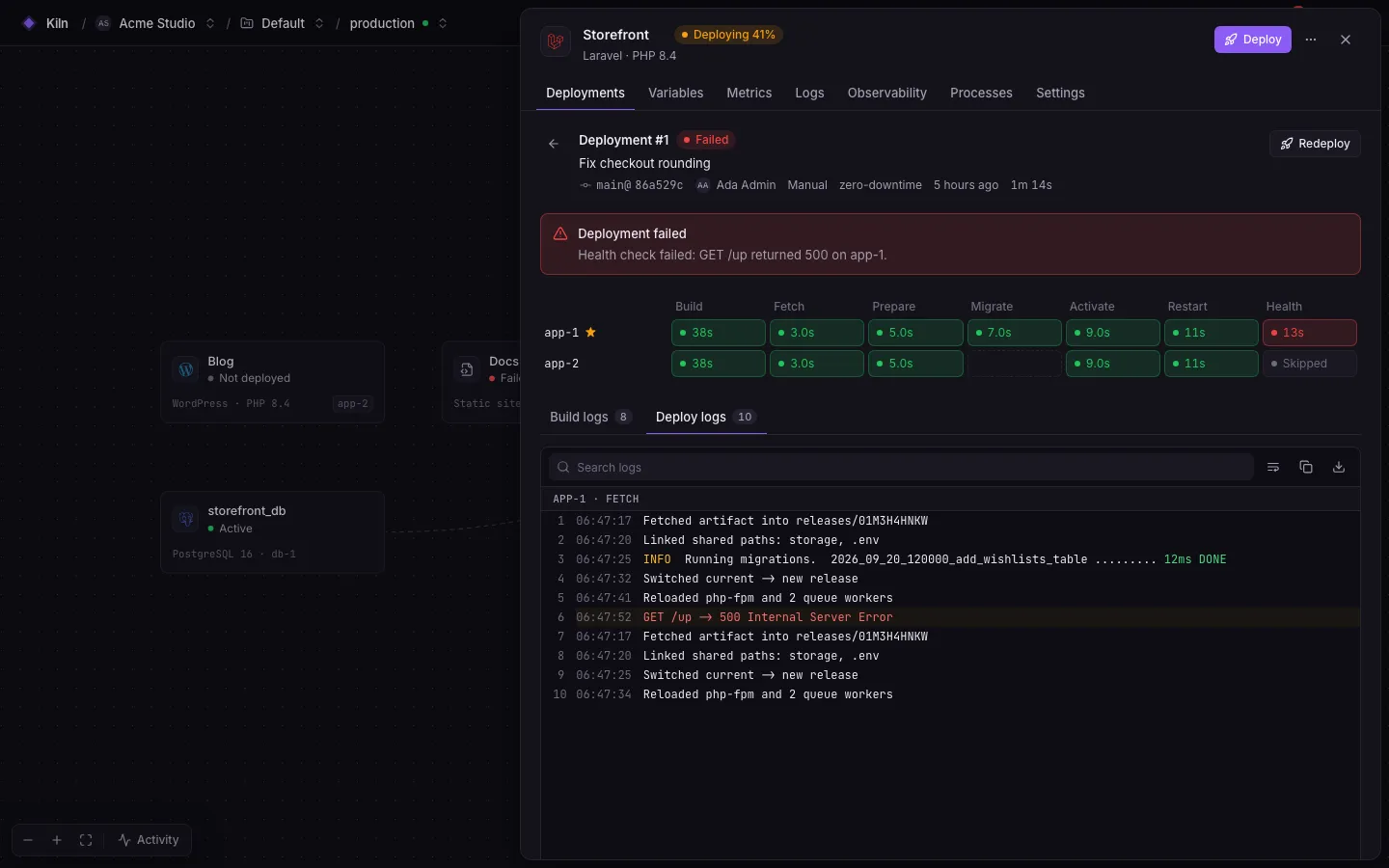
Statuses
Section titled “Statuses”| Status | Meaning |
|---|---|
queued |
Waiting behind another deployment of the same site |
waiting |
Some of the site’s servers are still being prepared (site user, PHP-FPM pool, Bun/Deno install). Starts by itself. |
building |
The build is running |
deploying |
Steps are running on servers |
succeeded |
All servers run the new release and passed the health check |
failed |
Something failed. With rolled_back: true, servers that had switched were returned to the previous release. |
cancelled |
Cancelled while queued, waiting or building (before anything touched the servers) |
A site runs one deployment at a time. Further deployments queue behind it.
Waiting for servers
Section titled “Waiting for servers”A deployment triggered while servers are provisioning waits for every preparing server rather than leaving late servers without a release:
- Servers whose preparation failed are skipped with a warning, as long as another server is ready.
- It fails if the leader fails to prepare, if no server can be prepared, or after 30 minutes (
FALAK_DEPLOY_WAIT_TIMEOUT_MINUTES). - New triggers while a deployment is waiting update that deployment (latest branch/commit wins) instead of creating another.
Triggers
Section titled “Triggers”| Trigger | API value | Source |
|---|---|---|
| Manual | manual |
Deploy in the UI |
| Push | push |
Push-to-deploy webhook |
| API | api |
REST API or falak deploy |
| Deploy hook | hook |
GET/POST /api/deploy/{token} |
| Rollback | rollback |
Manual or API rollback |
Strategies
Section titled “Strategies”| Strategy | API value | Runtimes | Behaviour |
|---|---|---|---|
| Zero downtime | zero-downtime |
native (default) | All servers fetch and prepare, then switch together (activation barrier) |
| In place | in-place |
native | Every server switches as soon as it is ready. Fastest; servers may briefly run different releases. |
| Rolling | rolling |
all | Servers switch in batches of batch size; each batch must pass its health check before the next starts |
| Canary | canary |
all | One server switches first and must pass its health check before the rest follow |
| Blue / green | blue-green |
docker (default) | The new container starts next to the old one and takes over after passing its health check |
| Compose | compose |
compose (default) | Every server pulls the new images, then all run docker compose up --wait; a failure restores the previous release’s files |
Change the strategy under the service’s Settings → Deploy. See Deployment strategies.
Health checks
Section titled “Health checks”After activation the control plane requests the health path on every server.
| Setting | Default | Range |
|---|---|---|
| Enabled | yes | |
| Path | preset (/up for Laravel, / for Node and Docker) |
must start with / |
| Expected status | 200 | 100–599 |
| Timeout | 10 s | 1–120 s |
| Attempts | 3 | 1–30 |
| Delay between attempts | 5 s | 0–300 s |
Only publicly trusted certificates (Let’s Encrypt, DNS-01) are verified during health checks. Internal-CA certificates are not.
Releases
Section titled “Releases”A release is the result of one deployment on the site’s servers.
- Native: a directory
/srv/falak/sites/<site>/releases/<RELEASE_ID>plus thecurrentsymlink. - Docker: an image reference (pinned).
- Compose: the rendered
compose.yamland.env, stored encrypted, with images pinned to digests.
Falak keeps the newest 5 releases per site by default (Releases to keep, 1–50) and prunes older directories after a successful deployment. You can roll back to any retained release. See Rollbacks.
What every release’s environment contains
Section titled “What every release’s environment contains”Each release’s .env (and the environment of its processes) includes your site variables with references resolved, plus:
| Variable | Value |
|---|---|
FALAK_SITE_ID |
Site id (upper-case ULID) |
FALAK_SERVER_ID |
Server id |
FALAK_DEPLOYMENT_ID |
The deployment that built this release (kept after a rollback) |
FALAK_RELEASE_ID |
Release id |
Supervised programs also get FALAK_SITE (the slug). Environment edits apply on the next deployment: a release keeps the variables it was deployed with.
Processes and deploys
Section titled “Processes and deploys”Workers, Horizon, Octane, daemons and cron only exist on a server once the site has a live release there. After activation, the restart phase converges the server’s process set with the new release’s environment. Programs whose definition changed restart; unchanged Horizon gets horizon:terminate; others get a restart. Octane is always restarted (not reloaded) so it serves the new release.
Timeouts
Section titled “Timeouts”| Step | Timeout |
|---|---|
| Fetch | 900 s |
| Prepare | 300 s |
| Deploy script sections (hooks) | 1800 s (FALAK_DEPLOY_HOOK_TIMEOUT) |
| Activate | 120 s |
| Restart | 300 s |
| Rollback | 120 s |
| Container swap | 900 s |
Compose up --wait |
300 s (FALAK_COMPOSE_WAIT_TIMEOUT) + 600 s |
Alerts
Section titled “Alerts”deployments.failed (critical), deployments.rolled_back (warning) and builds.failed (warning) can be routed to alert channels. See Alerts.