Packet capture
Since v0.18.0 an admin can capture a short stretch of traffic and open it in Wireshark. Captures can hold secrets (cookies, tokens, queries), so everything about them is opt-in, bounded, audited and short-lived.
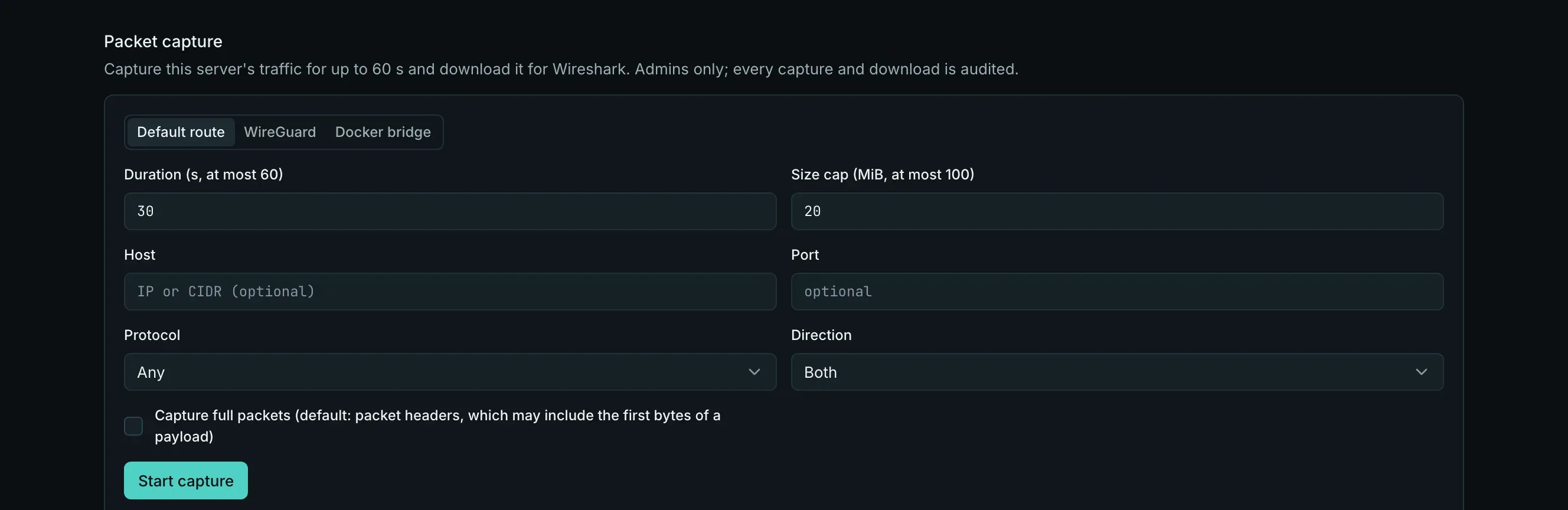
What a capture is
Section titled “What a capture is”| Setting | Values | Default |
|---|---|---|
| Target | A server (its host network), a site (its container; native sites: the host), a database instance | |
| Interface | Servers and native sites: default (the default route’s interface), wireguard, docker (docker0). Containers capture every interface of their namespace. |
default |
| Duration | 1–60 s | 30 s |
| Size cap | 1–100 MiB | 20 MiB |
| Snap length | Packet headers (the first 96 bytes, which may include the first bytes of a payload) or full packets | packet headers |
| Filter | Host (an IP or CIDR, never a name), port, protocol (tcp, udp, icmp), direction (in, out, both) |
everything |
There is no free-form BPF box: the filter is built from these fields. Full packets are an explicit choice with its own warning.
Run one
Section titled “Run one”- Server: the Packet capture section of the server’s Network tab (under Network tools).
- Site: the site panel’s ⋯ → Packet capture, with the server and service pickers.
- Database containers: the CLI and API for now.
Start asks you to confirm: Captures may contain sensitive data (cookies, tokens, personal data). The file is kept encrypted for 24 hours and every download is audited. The page then shows the progress (packets and bytes so far), a Cancel button and, once ready, the download link. The history lists the target’s captures with their status, size and expiry.
falak net capture --site shop --port 443 --duration 20 --yesfalak net capture --server app-1 --interface wireguard --host 10.90.0.0/24 -o mesh.pcap --yesfalak net capture --db shop-db --protocol tcp --full --yes--yes confirms the warning above. The CLI prints progress, waits until the capture is ready and downloads it to -o (default falak-capture-<id>.pcap, never overwriting an existing file). Ctrl-C cancels the capture.
POST /api/v1/servers/{server}/net-captures (or sites/{site}, databases/instances/{instance}), then GET /api/v1/net-captures/{capture} and GET /api/v1/net-captures/{capture}/download. See Consoles and network tools API.
Safety
Section titled “Safety”- Admins only by default: permission
network.capture, also needed to download. Site and database targets also needsites.view/databases.view. - Audited: started, cancelled and downloaded captures (target, filter, size, checksum); never packet data.
- Rate limited: at most 3 captures in progress and 10 an hour per organization; 2 at once per server.
- Never left on the server. tcpdump runs without promiscuous mode and drops root right after opening the interface; the agent streams the pcap, caps it at the size limit, uploads it in checksummed chunks and removes it, whatever the outcome. It refuses to start when the disk is short of space.
- Encrypted at rest on the control plane, with a key per capture sealed under the organization’s key, and deleted after 24 hours (downloads answer
410after that). - Inside a container the capture enters only that container’s network namespace, pinned and checked before entering.
- Functions can’t be captured.