Teams, roles and permissions
Access in Falak is per organization. Each member has one role, and each role grants a fixed set of permissions. API tokens use the same permission names as abilities.
| Role | Can |
|---|---|
| Owner | Everything, including deleting the organization and transferring ownership. Holds every permission. |
| Admin | Manage members, teams, credentials (cloud providers, git, DNS, backup storage), agents, terminal, recipes and every resource |
| Developer | Create and operate servers, sites, deployments, databases, processes, domains and templates |
| Viewer | Read-only access |
Owners are not invited; ownership is transferred. Invitations grant admin, developer or viewer.
Invite members
Section titled “Invite members”- Open Settings → Members and click Invite.
- Enter the e-mail address and pick a role.
- The invitee gets a link that is valid for 7 days.
Change a member’s role or remove them from the same page (permission members.manage).
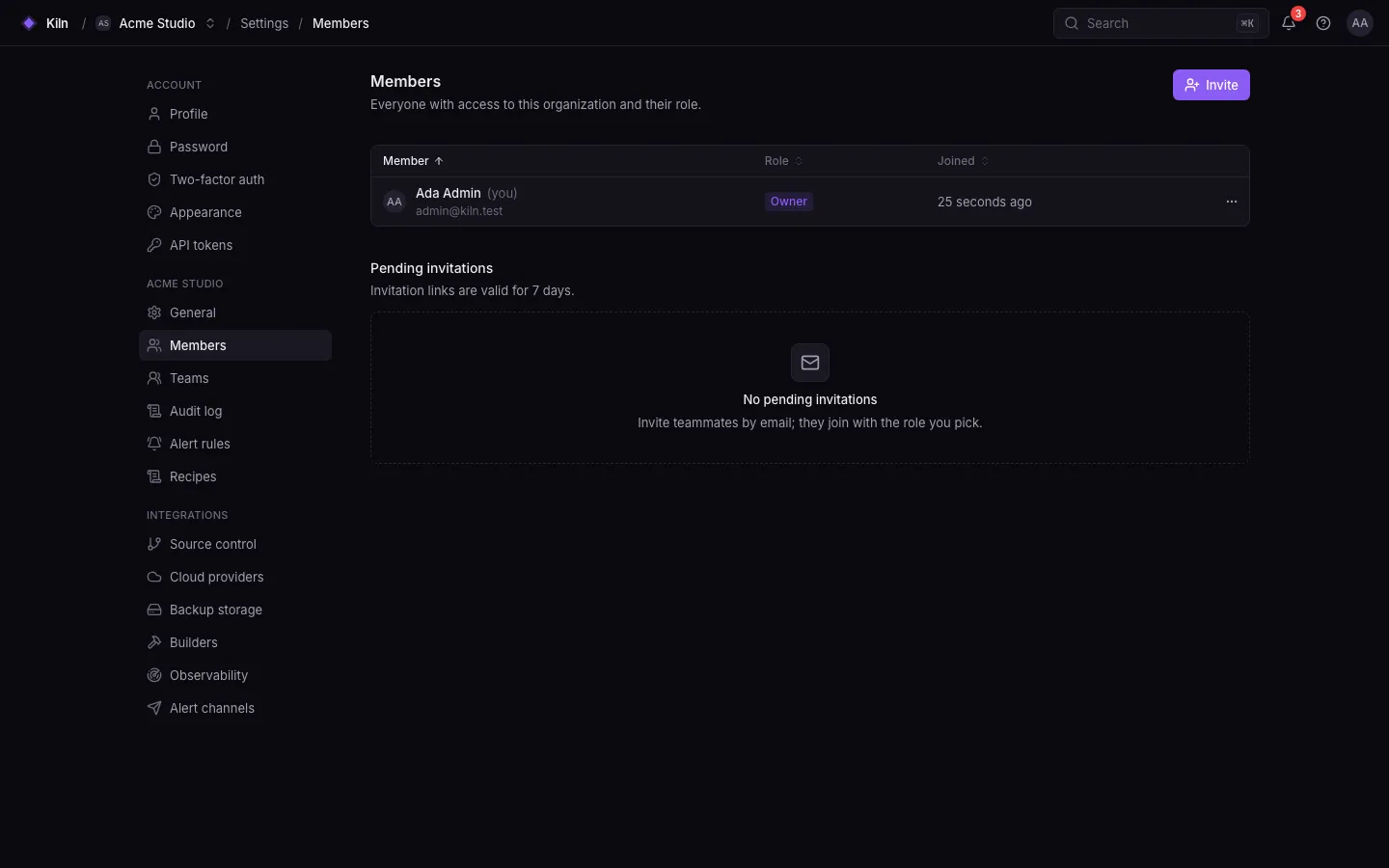
A team is a named group of members (for example “Backend” or “On-call”), managed under Settings → Teams (teams.manage). Teams organize people; access is still decided by each member’s role.
Permissions
Section titled “Permissions”| Permission | Owner | Admin | Developer | Viewer |
|---|---|---|---|---|
alerting.view |
✓ | ✓ | ✓ | ✓ |
alerting.manage |
✓ | ✓ | ||
audit.view |
✓ | ✓ | ||
builds.view |
✓ | ✓ | ✓ | ✓ |
builds.manage |
✓ | ✓ | ✓ | |
databases.view |
✓ | ✓ | ✓ | ✓ |
databases.manage |
✓ | ✓ | ✓ | |
databases.credentials.reveal |
✓ | ✓ | ✓ | |
databases.restore |
✓ | ✓ | ||
databases.storage.manage |
✓ | ✓ | ||
deployments.view |
✓ | ✓ | ✓ | ✓ |
deployments.create |
✓ | ✓ | ✓ | |
deployments.rollback |
✓ | ✓ | ✓ | |
deployments.manage |
✓ | ✓ | ✓ | |
edge.view |
✓ | ✓ | ✓ | ✓ |
edge.manage |
✓ | ✓ | ✓ | |
edge.dns.manage |
✓ | ✓ | ||
fleet.agents.manage |
✓ | ✓ | ||
fleet.commands.view |
✓ | ✓ | ✓ | ✓ |
insights.view |
✓ | ✓ | ✓ | ✓ |
insights.manage |
✓ | ✓ | ✓ | |
members.view |
✓ | ✓ | ✓ | ✓ |
members.manage |
✓ | ✓ | ||
network.view |
✓ | ✓ | ✓ | ✓ |
network.manage |
✓ | ✓ | ✓ | |
organization.update |
✓ | ✓ | ||
organization.delete |
✓ | |||
processes.view |
✓ | ✓ | ✓ | ✓ |
processes.manage |
✓ | ✓ | ✓ | |
projects.view |
✓ | ✓ | ✓ | ✓ |
projects.manage |
✓ | ✓ | ✓ | |
providers.view |
✓ | ✓ | ✓ | ✓ |
providers.manage |
✓ | ✓ | ||
recipes.view |
✓ | ✓ | ✓ | ✓ |
recipes.manage |
✓ | ✓ | ✓ | |
recipes.run |
✓ | ✓ | ||
servers.view |
✓ | ✓ | ✓ | ✓ |
servers.create |
✓ | ✓ | ✓ | |
servers.manage |
✓ | ✓ | ✓ | |
servers.delete |
✓ | ✓ | ||
ssh_keys.manage |
✓ | ✓ | ✓ | |
sites.view |
✓ | ✓ | ✓ | ✓ |
sites.create |
✓ | ✓ | ✓ | |
sites.manage |
✓ | ✓ | ✓ | |
sites.delete |
✓ | ✓ | ||
sites.env.view |
✓ | ✓ | ✓ | |
sites.env.manage |
✓ | ✓ | ✓ | |
sites.commands.run |
✓ | ✓ | ✓ | |
sites.compose.policy |
✓ | ✓ | ||
source_control.view |
✓ | ✓ | ✓ | ✓ |
source_control.manage |
✓ | ✓ | ||
telemetry.view |
✓ | ✓ | ✓ | ✓ |
telemetry.manage |
✓ | ✓ | ||
templates.view |
✓ | ✓ | ✓ | ✓ |
templates.manage |
✓ | ✓ | ✓ | |
terminal.open |
✓ | ✓ | ||
terminal.attach |
✓ | ✓ | ||
terminal.control |
✓ | ✓ | ||
terminal.recordings.view |
✓ | ✓ |
Descriptions of each permission are in Permissions reference.
Two-factor authentication
Section titled “Two-factor authentication”Each user can enable TOTP two-factor authentication under Settings → Two-factor auth, with recovery codes. Enforcing 2FA for a whole organization is not available yet.
Audit log
Section titled “Audit log”Settings → Audit log (audit.view) records sensitive actions: revealing variables, issuing install tokens, upgrading agents, changing domain settings, deleting organizations and more.
Several organizations
Section titled “Several organizations”A user can belong to several organizations and switch between them in the top bar. Create a new one with ⌘K → New organization. API tokens are pinned to the organization they were created in.