Volumes
Since v0.10.0 every piece of persistent data on a server is a volume Falak knows about: Compose named volumes, classic sites’ shared paths, database data, and volumes you create yourself. You can see their usage, grow them, browse their files, back them up, and clone or move them to another server.
Where to find them
Section titled “Where to find them”- A server’s Volumes tab: every volume on that server.
- A project’s volumes: ⌘K → “<project>: volumes”.
- A site’s Settings → Storage: the volumes attached to it.
- On the canvas (v0.19.0): a volume chip on a service’s card opens the volume over its service’s panel, with its Overview, Backups and Files tabs, while the canvas stays in view. A volume in Settings → Storage opens the same way.
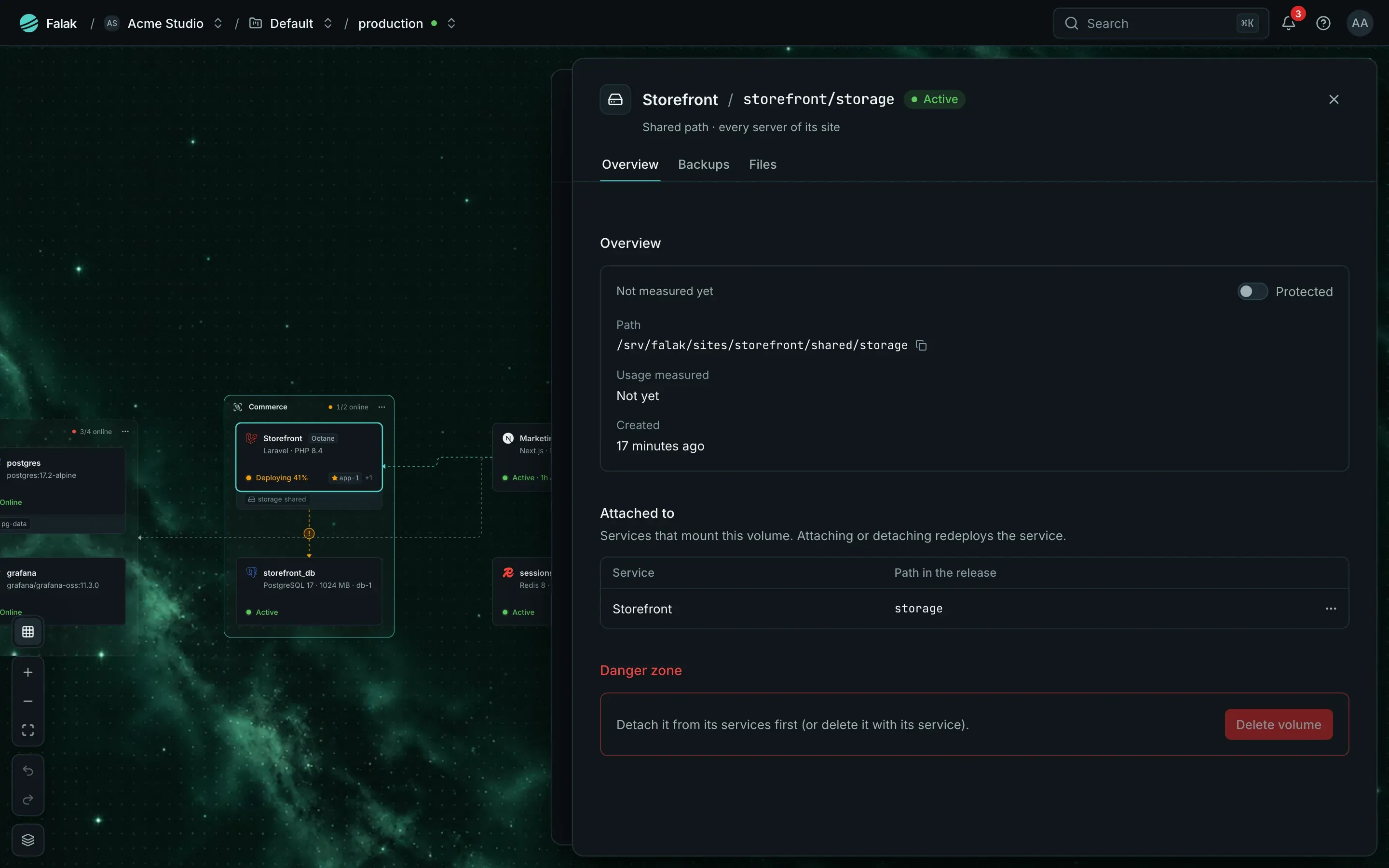
Usage is reported every 15 minutes (FALAK_VOLUME_USAGE_MINUTES); Refresh asks the server now.
| Kind | What it is | Size limit |
|---|---|---|
| Docker volume | A Docker named volume. Compose stacks’ named volumes become these when the stack deploys | none |
| Sized volume | An ext4 image file loop-mounted under /var/lib/falak/volumes/<id>: a hard size limit, grown online. Database data uses these |
16 MiB to 16 TiB |
| Host path | A host directory from the server’s allowlist (FALAK_VOLUME_BIND_ALLOW), admins only |
none |
| Shared path | A classic site’s shared file or directory (storage/, .env, …) on every server of the site |
none |
Docker and sized volumes can be backed up, restored, cloned and moved. Host paths, shared paths and Compose external volumes are only tracked: Falak doesn’t own their files and never deletes them.
Create and attach
Section titled “Create and attach”- On the server’s Volumes tab → New volume: a name (up to 63 characters), the kind, and a size for a sized volume. Optionally mark it protected and add labels.
- On a Docker site: Settings → Storage → attach the volume at a mount path, read-only if you like. The site is redeployed so its container gets the mount.
Compose services mount what their compose file declares, classic sites their shared paths, and database containers their data volume; you don’t attach those by hand.
Grow a volume
Section titled “Grow a volume”Resize a sized volume to a larger size. It grows online (no restart). Shrinking is refused: ext4 can’t shrink while mounted.
A volume with a size limit fires volumes.almost_full above 85 % (resolved below 80 %), with a Grow volume action.
Browse and download files
Section titled “Browse and download files”A read-only file browser lists a volume’s directories and searches names. Download a file or a folder as an archive (up to 1 GiB before compression, FALAK_VOLUME_DOWNLOAD_MAX_BYTES); the download is staged in your storage provider and removed after a day. Browsing needs volumes.browse (owners and admins) and is audited. Database volumes are never browsable: read their data through backups.
Back up and restore
Section titled “Back up and restore”Volume backups work like database backups: schedules with retention, Back up now, keys held by Falak or customer-held (age), restore, and restore drills. A backup is a tar | zstd archive encrypted on the server (.tar.zst.fkb); see Backups and drills for the format, keys and falak-restore.
Each schedule picks how containers that use the volume are treated while it is read:
| Consistency | Behavior |
|---|---|
none |
Read while they write; fine for append-only or rarely written data |
pause |
docker pause for the seconds the copy takes |
stop |
Stopped, then started again |
A volume drill unpacks the latest archive into a scratch directory, checks it and compares the file count with the archive’s (±10 %), then removes it. Drills default to weekly for volumes used by a production site. Alerts: volumes.backup_failed, volumes.backup_missed, volumes.drill_failed, and their recoveries.
Clone and move
Section titled “Clone and move”- Clone copies a volume into a new one, on the same server or another (through your storage provider; the transfer backup is removed afterwards).
- Move takes a volume to another server: its services stop, the volume is archived and restored there under the same name, its services switch to it and redeploy, then the source is deleted. Type the volume’s name to confirm. The services must already run on the target server, and they are down from the archive to the redeploy. A failed step stops the move with the source untouched.
Protect and delete
Section titled “Protect and delete”- A protected volume can’t be deleted; only admins can turn protection off. Database data volumes are protected.
- Deleting asks you to type the volume’s name. Attached volumes are detached first.
- Deleting a site keeps its volumes unless you choose to delete them too.
Permissions
Section titled “Permissions”| Action | Permission | Roles |
|---|---|---|
| View volumes, usage, attachments, backups | volumes.view |
owner, admin, developer, viewer |
| Create, attach, resize, back up, restore, clone, move, delete | volumes.manage |
owner, admin, developer |
| Browse and download files, export backup keys | volumes.browse |
owner, admin |